 ago
agoSave the little thing.
Descaling, chain care, photo backups. Add what you want to remember, with a rhythm that works for your everyday life.
For everything that needs a little care
When did you last do that? ago52 remembers when you took care of it. And shows you when it is time again.
Meet ago52Coming to iPhone · iOS 26 or later
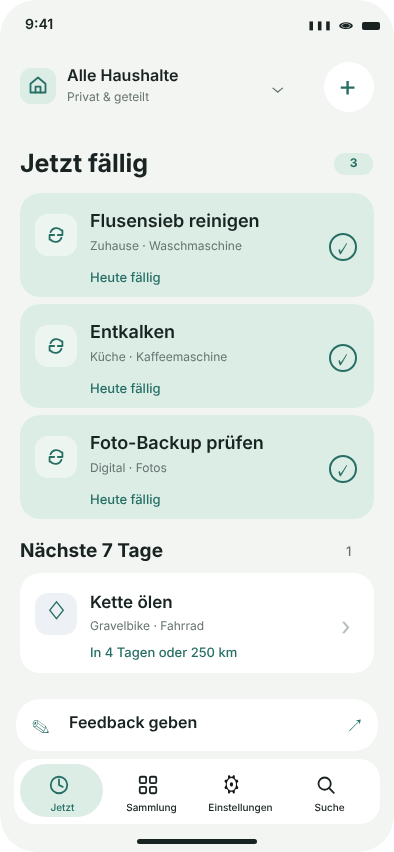
A look at ago52 · German design preview with example data
Set it up. Take a breath.
Descaling, chain care, photo backups. Add what you want to remember, with a rhythm that works for your everyday life.
The Now view shows what is due and what is coming up in the next seven days. Turn on notifications if you would like a reminder, too.
Log when you did it. Your next due date follows the actual completion. Your history is there whenever you need to look back.
Know that “I really should…” feeling?
For the things that rarely look urgent. Organize them by area and device, with everything in its place.
For example: descale the coffee machineTrack time and kilometres since the last service. Keep notes and maintenance records right with your bike.
For example: take care of the chainWhen was your last backup? Log when you backed up or checked your files. ago52 reminds you when it is time again.
For example: check your photo backup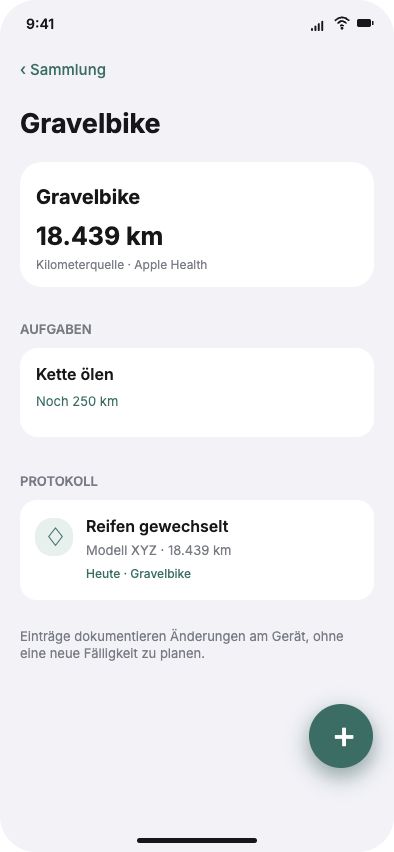
Your care history, right with your device.
Everything has its own rhythm
Some things need care after a few weeks. Others after many kilometres. ago52 can track both together: whichever limit comes first.
Take care together
Share a household and see what needs doing and what has been done. Private spaces stay separate. Home, office or workshop: choose one household or keep them all in view.
Right on your Home Screen
Widgets show upcoming activities right on your iPhone. Important things that are due come first. Or choose a particular activity you want to keep in view.
How ago52 worksA few quick answers
ago52 is being prepared for release. There is no public App Store link yet. For questions about testing, contact us at ago52@davmu.de.
Not yet. Join the Android waiting list to receive a one-time email when ago52 launches on Android. The signup form is in German.
No. You can simply record when you last did something. Only add a schedule if you want to track when it is due again.
Yes. You can create private entries without a separate sign-in. Sign in with Apple when you want to use a shared household. Private entries are never shared automatically.
It is the little things
ago52 grows with the things you care for. Share your ideas and help shape what comes next.